One record. Useful every day.
Labs, protocol history and the daily record, connected in one place. Explore how ILAI helps patients understand their day and gives practices context for the next review.
Status: Practice demos are available now. First practice deployments are being prepared. ILAI for iPhone is coming to the App Store; join the list. Upcoming capabilities are marked in development.
-
Your record
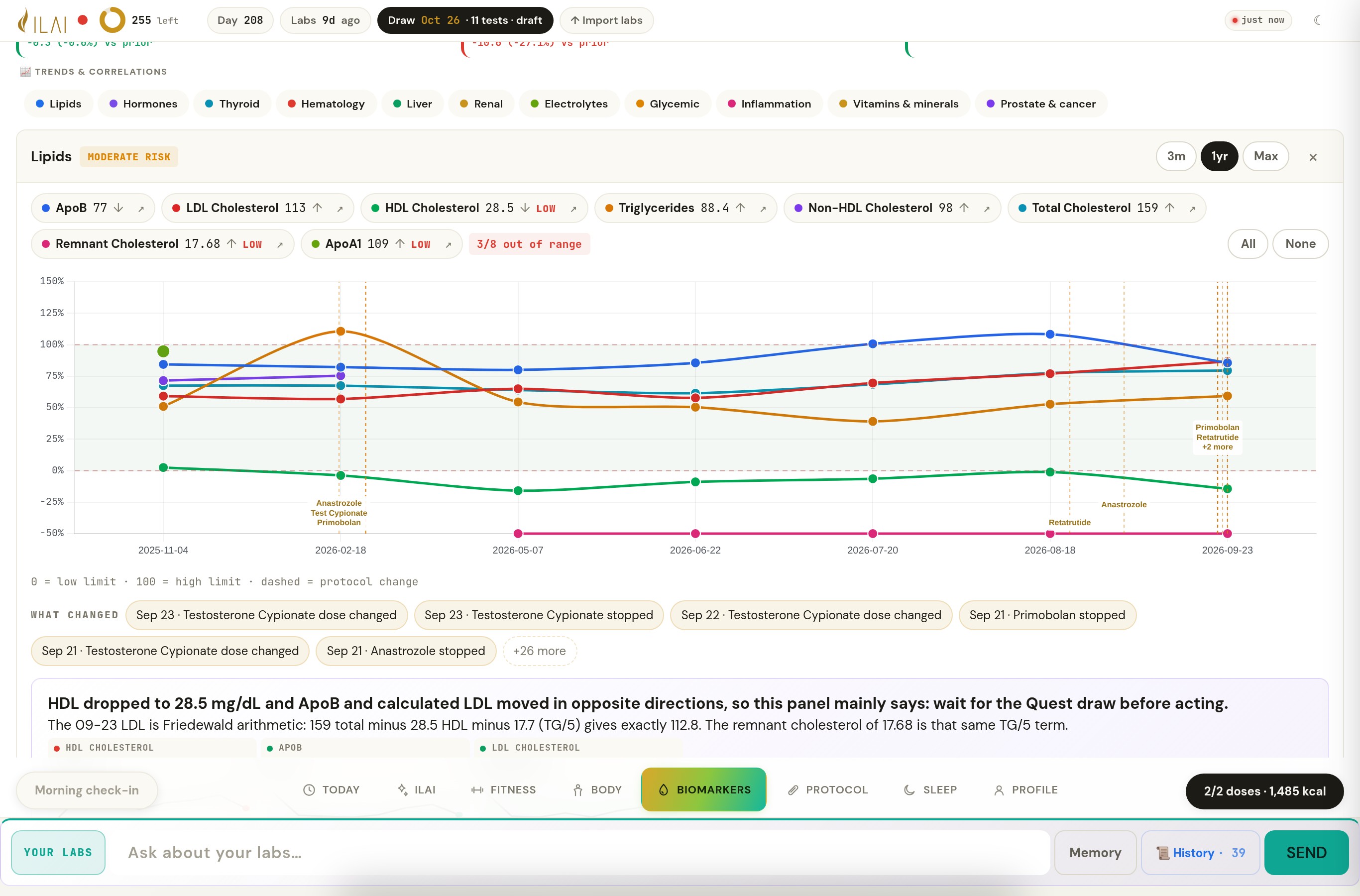
Years of draws from any lab, read as one record.
- Lab PDFs from any lab, with the lab and method kept on every result
- Eleven domain panels and a sheet for every marker
- Lab concordance: which results its comparisons may use
Practices and individuals Everything in this area →
Founder’s own record, shared with permission. -
Today
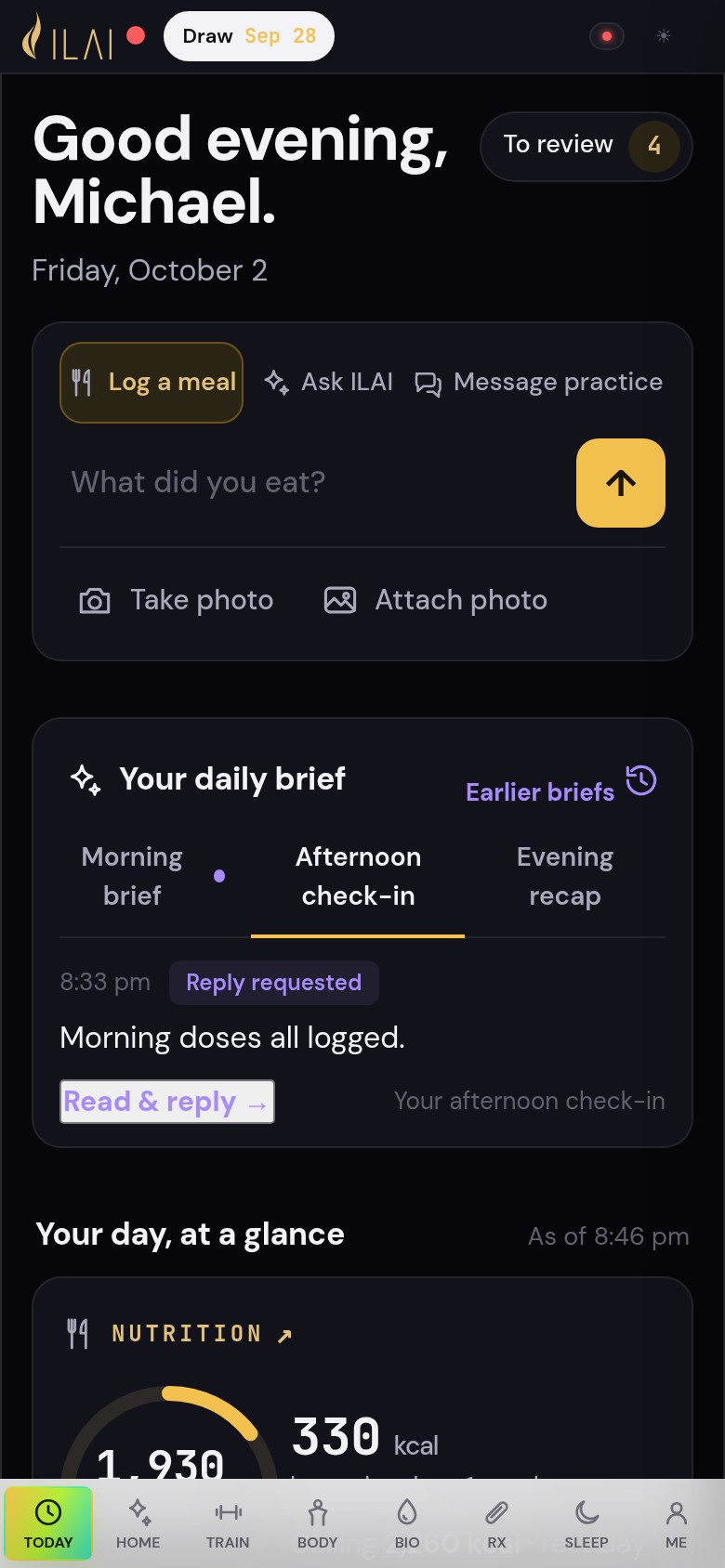
Your day, with ILAI close at hand.
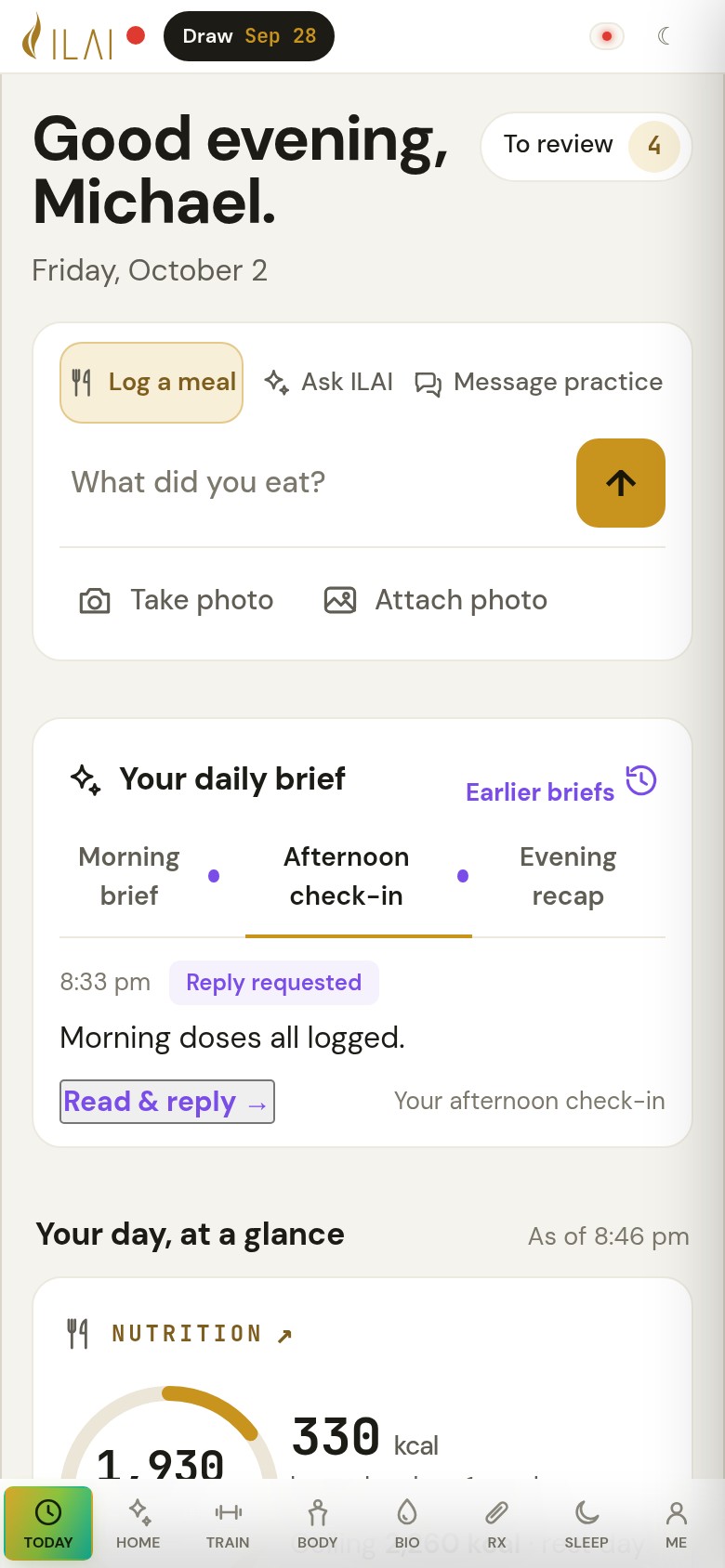
- Log a meal, ask ILAI a question or message your practice from one composer
- The day at a glance: intake, protein, steps, doses
- Morning brief · Afternoon check-in · Evening recap, read and answered in place
Practices and individuals Everything in this area →
Synthetic patient. Recorded ILAI workflow. -
Ask ILAI
Ask in plain words. See the results behind the answer.
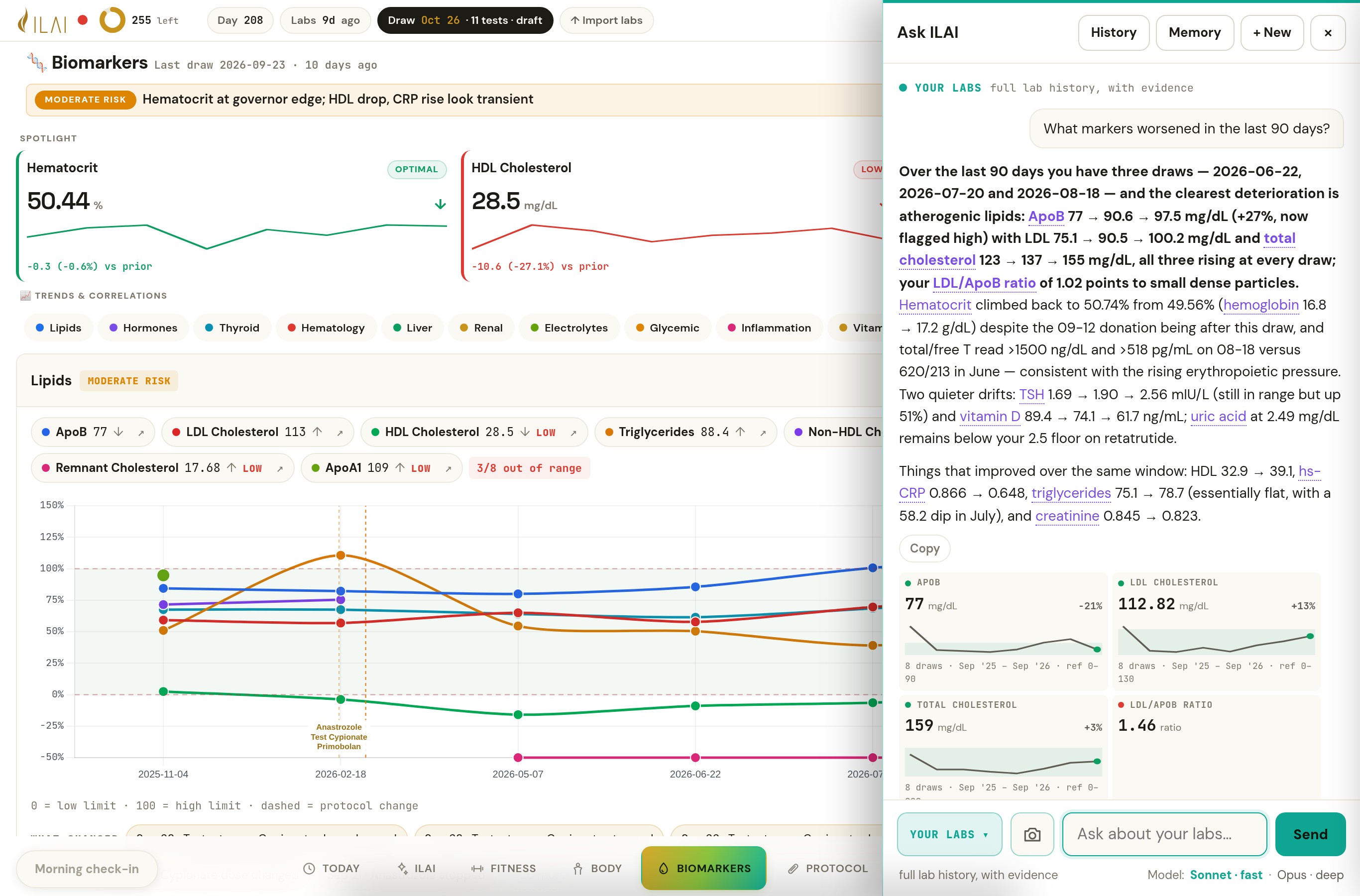
- Answers from the patient’s own draws, with the dates and values used
- Statistics computed by ILAI and shown with the answer
- Evidence tiles so a sentence can be checked against the record
Practices and individuals Everything in this area →
Founder’s own record, shared with permission. -
Your care team
The context for the next review, and a conversation that stays in ILAI.
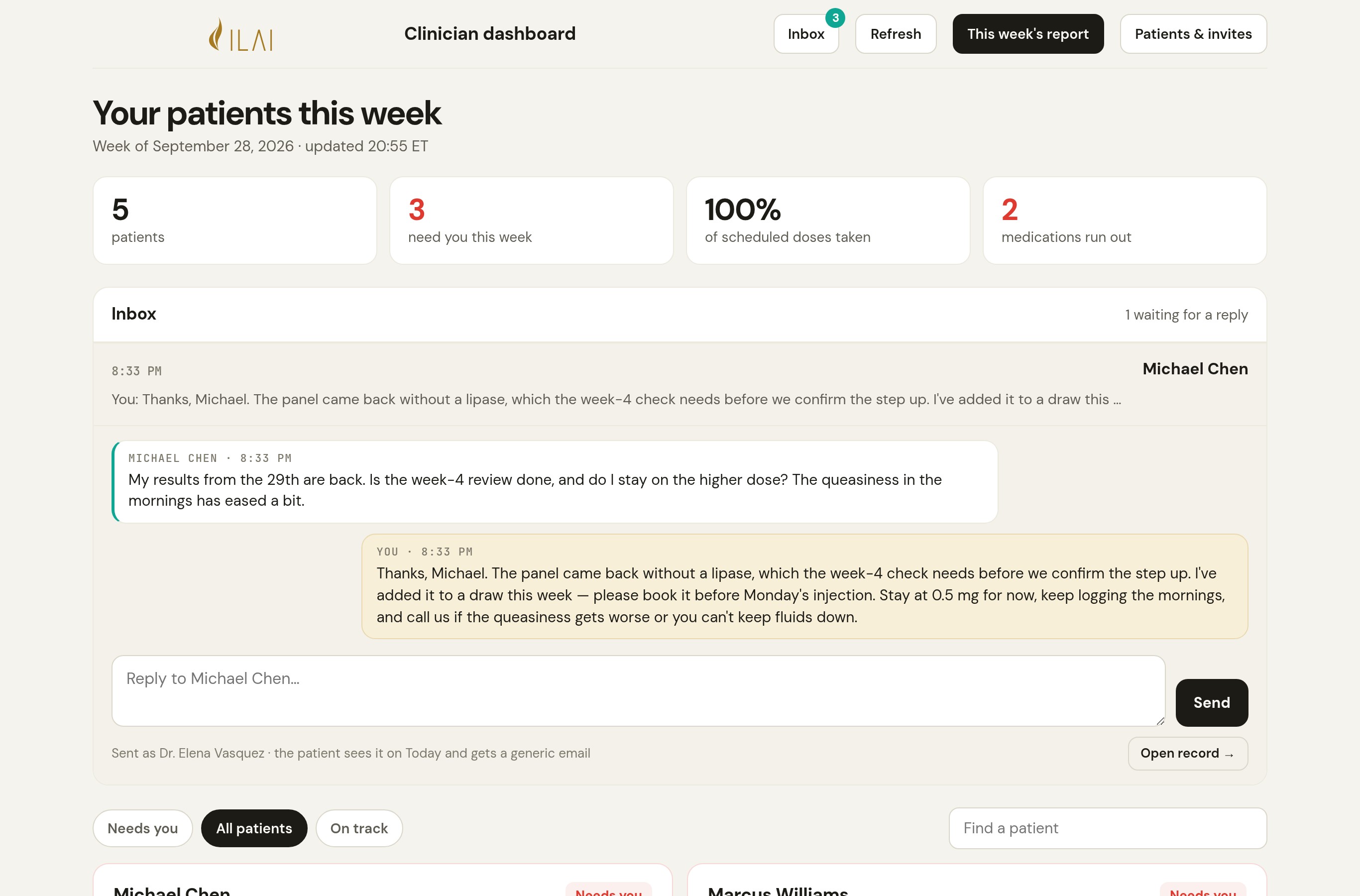
- The clinic page puts the patients who need a review first
- Patients write from Today; the practice replies from the Inbox
- A weekly report for the whole practice
Practices Everything in this area →
Synthetic practice. Recorded ILAI workflow. -
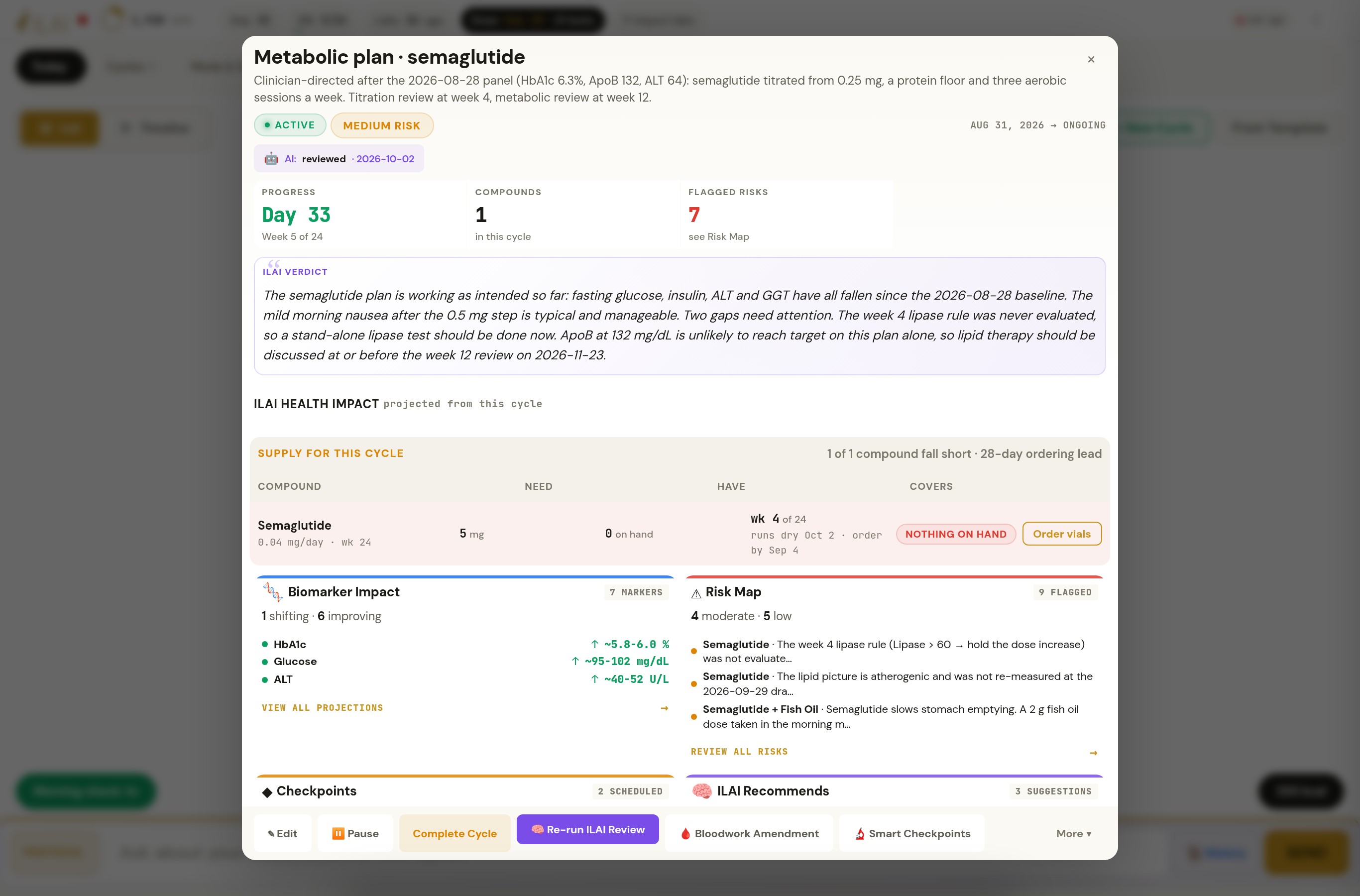
Protocol and next draw
Every dose, every change, every checkpoint — and the lab order that follows.
- Cycles with checkpoints and rules; a status for every scheduled dose
- Checkpoint rules say evaluated or not evaluated, never “passed” by silence
- The next requisition with a rationale on every line
Practices Everything in this area →
Synthetic patient. Recorded ILAI workflow. -
Estimates and methods
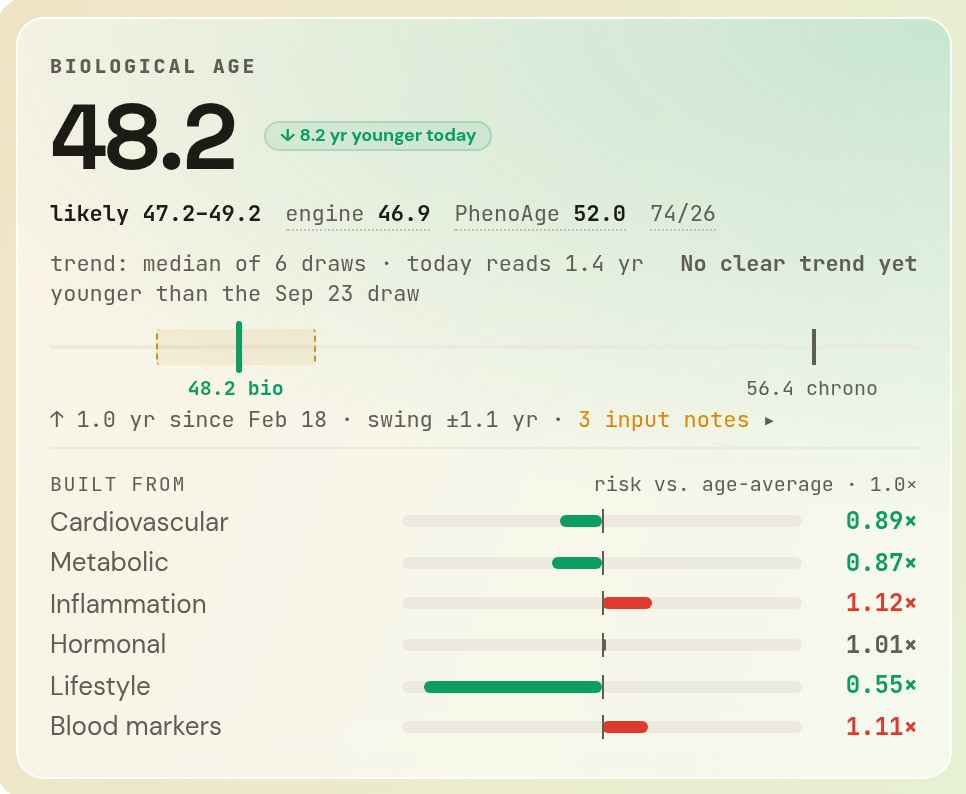
One biological-age estimate, with its range and what it is built from.
- The ILAI Clock blended with PhenoAge from the patient’s own blood work
- A likely range beside the number, and the inputs that moved it
- Methods published in the library
Practices and individuals Everything in this area →
Founder’s own record, shared with permission.
Years of draws, from any lab, read as one record.
For practices and individuals. The lab read, the domain panels, the marker sheets and Ask ILAI are in ILAI for iPhone; the Quest test-code library serves practice requisitions.
- Lab reports as PDF, from any lab that issues themThe report arrives as the lab's PDF; that is the one step the person takes. ILAI records every marker on the page under one standard name, keeps the lab's own label beside it, and takes in whatever was drawn. There is no fixed panel. Reading Quest's own result files directly is in development.
- Standard marker namesOne lab's "Mean Corpuscular Volume" and another's "MCV" are one marker to ILAI, so a result is compared across years instead of splitting at each rename. The original label is kept, and updated mappings also apply to earlier results.
- Lab and method on every resultILAI remembers which lab and which method produced each result, and whether that method is good enough to act on. A trend is fitted within one test; other labs' results are shown beside it, never averaged in.
Everything in this area · 8 more
- Lab concordanceILAI treats a primary lab (Quest / Ulta) as the reference. A monthly direct-to-consumer result is trusted only within tolerance of its own prior, unless a protocol change explains the gap. Outside that, it is flagged, never silently excluded.
- Results beyond assay limits stay clearly markedA result beyond the assay’s reporting limit is kept as a limited value (greater-than or less-than), not as a number. “>1500 ng/dL” stays above the limit on every chart and in every review, and is left out of any statistic that needs an exact value.
- Marker targets with reasonsILAI judges a result against the target set for this person, not only the lab's range, and remembers who set that target and why. A constitutional low reads "your normal", not "below range".
- Eleven domain panelsLipids, hormones, thyroid, hematology, liver, renal, electrolytes, glycemic, inflammation, vitamins & minerals, prostate & cancer. Each panel plots its markers over every draw, marks the last result against the prior one, and places the protocol events that could explain a move on the same chart.
- Marker sheetFor one marker: the trend ILAI fitted, its slope and how confident the fit is, the lab's reference range beside the person's target band, the assay note, and the protocol events along the timeline. Ask ILAI about that marker from the sheet.
- Ask ILAI with computed statisticsNamed markers are resolved against the patient's own lab names; sample size, span, mean, median, min, max, slope per year and same-date Pearson r are calculated by ILAI itself and shown with the answer. ILAI supplies these precomputed statistics with the answer and shows the lab results it used, so your team can check the explanation.
- Evidence tilesLab answers show the results they used, as tiles: the markers, the draws, the span and the reference range, so a sentence can be checked against the record it came from.
- Quest test-code library (practices)Each marker maps to its Quest test code, specimen, fasting requirement and category, so the requisition ILAI drafts names the exact test.
Your day, with ILAI close at hand.
For practices and individuals. Care-team messaging is available through participating practices.
- The ledgerThe app opens on ILAI’s read of the day so far: intake against the ceiling it set, protein and steps against their floors, which doses are confirmed and which are not, and the one thing it would have you do today. A “To review” count holds what ILAI is waiting on: a reply from the practice, a question it asked, a dose still unconfirmed by evening.
- One composer, three actionsA meal by text or photo, a question for ILAI, or a message to the practice, from one box. The meal is sent so the brief has the facts. To change an entry, open the meal in Today’s log and choose Correct or Remove; a follow-up message about a meal logged today is applied to that meal, and the entry shows what changed.
- The practice conversation (practices)A patient writes from Today. The practice answers from the clinic page’s Inbox, and the reply lands on Today under the clinician’s name. ILAI holds an unread reply in To review until it is read; the alert email says only “You have a new message in ILAI. Sign in to read it.”
Everything in this area · 1 more
- The full record, behind itThe full record builds in the background while Today is already on screen, and a pill says when it is ready. Biological age and healthspan stay on the ILAI tab, because they move per draw, not per day; the one thing is a row on Today and the full card on ILAI.
What changed overnight, with the numbers it used.
The morning brief, the signals, the Apple Health bridge and the symptom record are in ILAI for iPhone. The daily digest on the clinic page is for practices.
- Morning briefEach morning ILAI compares the night with the last seven and thirty days and writes one read: the one priority, what improved, what to watch. The evidence tiles beside it show the exact figures the read was written from.
- Follow-up questions with real buttonsILAI asks rather than assumes. When the read needs a fact it does not have, it asks, with Yes / No, a choice, or open text. The answer is kept and fed to tomorrow's read; an answered question leaves the open list.
- Today's signalsHRV, resting HR, sleep, blood pressure, weight, VO₂ max, walking, steps and dose compliance, each judged as a seven-day mean against the thirty-day baseline, with the last reading underneath. A partial day is labelled "so far today" and left out of completed-day comparisons.
Everything in this area · 10 more
- Apple Health, through a native bridgeThe watch's record reaches ILAI through a native HealthKit bridge: resting and active heart rate, HRV, sleep with stages, steps, blood pressure, body fat, respiratory rate, glucose and more, deduplicated by timestamp and source. ILAI says how fresh each metric is and how many days stand behind it, and leaves out one with too few.
- VO₂ max estimate and calibrationILAI estimates VO₂ max from the wearable and labels it an assumption until a calibration test replaces it. It never presents the estimate as a measurement.
- Morning check-inILAI opens the morning with what it already knows: the overnight figures from Apple Health, badged as synced, with the change against baseline. It asks only for what did not arrive, plus how the morning feels, in one tap or free text, and an optional quick signal (bedtime, wake-ups, screens, libido, mood, appetite, water, the reason for a missed dose) whose questions follow the state of the record. A skipped check-in is asked about again in the evening, never assumed.
- Symptoms, checked against the protocolA symptom is recorded once, in plain words, with severity and a note. ILAI then checks it against the protocol, the markers that class of compound moves, and the wearables, and looks for a pattern across entries. Ninety-seven symptoms in eighteen categories.
- Photo check-insPosed photos on a cadence, kept with the record. ILAI gives a visual read on request.
- Goals and milestonesWhat the person set out to do, and the milestones reached, stay with the record and are named in the daily brief.
- Proactive outreach, three moments a dayThree times a day ILAI checks what it is still missing and asks. 10:00 the day's read; 12:00 the morning doses it has no confirmation for, the daily sexual-health question and a draw reminder; 19:15 the backlog of unconfirmed doses and a watch that has gone quiet. When a patient doesn't answer, the next question waits for the next scheduled moment; nothing repeats within the day, and Today stays quiet when nothing is outstanding.
- Dose confirmations in everyday language"All except Thursday's" is read by a model that can only touch unconfirmed doses, asks again when ambiguous, and echoes back what it applied. A dose with no answer stays unconfirmed; ILAI never marks it taken on its own.
- Sexual wellness as a vital signILAI compares morning-erection rate over the days answered with the prior period, activity frequency per 30 days with an observational reference, and streaks and dry spells only for days that were answered. Ten sexual-health symptoms in the dictionary are checked against the protocol and the labs. The daily prompt goes to the patient only; what the patient logs is in the record and can appear in the daily brief and the clinician card. Sexual-health entries are visible to the patient and their authorized care team; service providers process data as described on the Security page.
- Daily digest (practices)Each morning the practice's clinic page carries the day's read and the figures it was written from.
Training judged against the labs, the protocol and recovery. Sleep lined up with the next morning.
- The glanceThe Fitness tab opens on ILAI’s accounting of the day: what went in, what goes out (BMR, activity and sessions), what is left, protein against its target and floor, weight against the goal, today’s session, and ILAI’s line for the day.
- Fuel beside TrainFourteen days of intake are set against Apple Health burn beside the week’s prescription, so a run of under-fuelled days is seen next to the sessions it would downgrade. The Nutrition panel keeps the day-by-day history.
- Workouts entered by handFor the session the dead phone or watch never recorded: type, date, minutes, an optional average heart rate. ILAI counts it in the week, the load chart and the fuel ceiling, and shows a hand entry within thirty minutes of a watch workout as a duplicate rather than counting it twice.
Everything in this area · 13 more
- Easy walks kept honestILAI judges a walk, hike or run by its heart rate, not by what the watch called it: under 60% of maximum it counts for burn and steps, never as zone 2.
- Training phases (arcs)A span of weeks with a purpose (Build, Cut, Aerobic base, Cruise, Recovery, Travel), a prescription, a photo check-in cadence and gates. ILAI maps the protocol onto it: the weeks of a blast (a high-dose cycle) become a Build arc with a Recovery arc for the last two; a cruise becomes a Cruise arc.
- PrescriptionSessions per week by type with minutes (strength, zone 2, Norwegian 4×4, mobility) and a daily step floor, started from templates of real training splits and edited per arc.
- Gates from the labsThe labs can overrule the plan. Uric acid under 2.5 blocks 4×4; seven-day HRV under 80% of the 30-day baseline downgrades intensity; hematocrit at 52 or above blocks the VO₂ test. Which gates apply is set per arc in the arc editor; the thresholds are ILAI's defaults. The plan shows the gate and the value that tripped it.
- This week and todayILAI reads the week against the prescription: sessions and minutes done, step days at the floor, today's session and the planned sessions remaining this week.
- Load over twelve weeksMinutes by session type, compared with the prescription over twelve weeks, with the weekly step average under each week.
- Working setsBench, squat, deadlift, overhead press, row, pull-up. ILAI estimates a one-rep max by Epley from the working sets; two or three a week give it a musculoskeletal trend to follow.
- Engine and body since the arc beganVO₂ max (an assumption until a calibration walk), resting HR and HRV measured against where the arc started; weight and body fat over 120 days.
- Photo check-ins on the arc's cadenceDue dates set by the arc; ILAI gives a visual read on request.
- Sleep score and architectureILAI scores each night and compares deep, REM, core and awake with their targets, across the last seven nights.
- Sleep correlations, ninety daysDuration to next-morning HRV, duration to resting HR, deep-sleep share to HRV, each calculated from this person's recorded nights, with the correlation and sample size shown, so the link is this person's, not the literature's.
- Consistency, efficiency, recommendationsDuration variance and efficiency over ninety days, then the lever ILAI names: a bedtime locked within fifteen minutes, total sleep extended for REM, a sleep study when awake time persists.
- Sleep hygiene recordWhat was tried for sleep, dated: checked, noted, scheduled or added to the protocol, so a later change in the nights can be lined up with it.
Intake judged against a ceiling and floors set for this person, with adequate intake first on a GLP-1.
The meal read and ILAI’s targets are in ILAI for iPhone. Targets set by a care team, and the totals a practice sees, need a practice.
- A meal, by text or photoThe person sends the meal from Today, as text or a photo; that is the one thing ILAI needs from them here. ILAI identifies the foods, portions and nutrients (calories, protein, carbs, fat, fibre, fluids and electrolytes) and gives each as an estimate with its likely range. To change an entry, open the meal in Today’s log and choose Correct or Remove; a follow-up message about a meal logged today is applied to that meal. A meal not sent is shown as not sent, never as zero.
- A ceiling from Apple Health energyILAI sets the day’s ceiling itself. BMR is the median basal energy of complete Apple Health days; rest-day activity and each training session are added as they land; the arc’s direction sets the deficit or surplus, and the arc leads when it disagrees with the weight goal, which ILAI says. Apple’s figures are estimates, and ILAI labels them as such.
- Targets set per patientThe nutrition view distinguishes a calorie ceiling, a minimum intake floor, and a protein floor and target, with floors for fluids and sodium. ILAI starts every patient on its own defaults and labels them as defaults; the care team can set any of them, and every surface labels each target and floor “ILAI default” or “care team”, and the practice report compares intake with them. ILAI knows a patient is on a GLP-1 from the active protocol, not from a setting.
Everything in this area · 3 more
- ILAI at noon and in the eveningILAI checks the day twice. At noon, protein so far. From five, whether the day sits under its floors and whether the record is complete; low salt or fluids on a GLP-1 day as a question, never an instruction; and the hydration concern when nausea repeats, with the care team named as the next step. Over the ceiling is raised only as a pattern across the week, never for one day.
- Tied to trainingA session raises the day’s ceiling; a run of logged days well under it downgrades a Build arc’s intensity, through a gate the plan shows with the days that tripped it.
- The practice sees totals (practices)ILAI reports to the practice what bears on the protocol, not the meals: under-floor days, and nausea or vomiting recorded three of seven days on a GLP-1, on the clinician card and in the weekly report. Meal photos are the patient’s alone; no clinician or administrator account can open one.
The ILAI Clock, blended with PhenoAge. One biological-age estimate, with its range and the factors behind it.
For practices and individuals.
- The ILAI ClockILAI’s proprietary engine works through the body system by system, drawing on your lab history and accounting for the quality of each test. Blended with PhenoAge, it produces biological age, estimated life expectancy and estimated healthspan from one underlying calculation. Each estimate shows its range and the factors that shaped it.
- The estimate, its range and its contributorsThe likely range, the ILAI Clock and PhenoAge figures, the factors that shaped the estimate, and "no clear trend yet" when the swing is larger than the move.
- Built fromCardiovascular, metabolic, inflammation, hormonal, lifestyle and blood markers: which pushed the estimate up and which pulled it down, against what is typical for the patient’s age.
Everything in this area · 3 more
- Healthspan scenariosWhat would lengthen healthspan, with projected years, labelled as library estimates scaled by adherence and tagged "clinician" where a prescription is involved.
- Bio-age trend from stored snapshotsILAI remembers each estimate as it was made. A method change is replayed explicitly so the trend never mixes methods.
- Body map, 13 systemsEach system carries one measure: an engine age where the literature supports one, a validated index where it doesn't, the worst out-of-range marker otherwise, or "no data". Never a bare dash. Flagged, watch, quiet and no-data are counted.
The protocol as ILAI reads it: every dose, every change, every checkpoint.
In ILAI for iPhone: the protocol on record, and the dose confirmations that let ILAI read it. Cycle planning, dosing protocols and checkpoints are practice tools; the iPhone app has no dose calculators and proposes no dose changes.
- Compound registry (practices)A standard compound library with pharmacology, therapeutic class, target domains, expected marker direction, response windows and safety tier, plus curated dosing protocols with titration that becomes a taper schedule.
- Compound-to-marker mapEvery class knows which markers it moves, so a marker change is lined up against the compound changes around it and a symptom is checked against the right labs.
- Cycle builder (practices)One canvas for a cycle: compounds, doses, routes, frequencies, weeks. As it is built, ILAI shows whether supply covers it and where the checkpoints fall; the suggested checkpoints come from the rule engine, and a pre-flight read from the AI before the cycle starts.
Everything in this area · 9 more
- Checkpoints with rules (practices)Each checkpoint carries marker rules (operator, threshold, severity, recommended action). A rule flags; it never changes a dose on its own. Completed checkpoints record the actual draw date and which rules were evaluated.
- A clear status for every scheduled doseILAI knows each scheduled dose as taken, skipped, due, ahead, off or unconfirmed. A dose with no answer stays unconfirmed and is asked about again; ILAI never fills the blank with a guess.
- Standing compounds and cycle compounds, one protocolMaintenance compounds and cycle compounds are treated as one protocol, each inside its own dates, so every review and every chart sees the whole of it.
- Protocol events journalILAI remembers starts, stops, dose changes, restarts, vaccines and donations in plain English, draws them on every chart and hands them to every review, so a marker move is explained against the change that preceded it.
- TimelineEvery cycle, compound and checkpoint on one Gantt with today's line and popovers.
- Supply, inventory and ordersLots on file, orders in flight, days covered and the reorder window, per compound; ILAI names what needs action.
- Providers and refillsProviders on record, refill requests with their status and a message to the provider.
- Seasons and arcsTraining periodisation as a first-class timeline: an arc has a purpose, an end date, a training prescription, a photo cadence and gates; a season is a run of arcs toward a date.
- Cycle templates (practices)Save a cycle as a template and start the next from it.
Rules calculate. AI explains. Your team reviews.
Cycle reviews, bloodwork amendments and the requisition pass are practice tools.
- Cycle review (practices)Risk flags per compound and interaction, checkpoint changes, projected marker moves with units and dates, and the LE impact. The verdict is derived from the review's own flags, with the basis shown; the model's own verdict is kept beside it.
- Evaluated versus not evaluatedThe review is told, rule by rule, whether the marker was measured at that draw. It says "not evaluated", never "did not trip".
- Calendar and record blocksToday, cycle week, every checkpoint with "N days from today", every event since the last draw dated against the next one, and a whole-record summary per marker, so the model is handed every gap and count instead of working them out.
Everything in this area · 6 more
- Bloodwork amendment (practices)Dose changes are calculated by rules from how fast each marker is moving. The model narrates the picture and flags interaction and safety nuance. Censored labs are named as such. Your team reviews and accepts or declines the proposed changes.
- Requisition AI pass (practices)What the rules missed and what to settle before the draw. Suggestions already covered by the draft are marked covered; a review written for an earlier draft is marked outdated.
- Onboarding reviewAn AI read of the intake, framed around the four horsemen of chronic disease, acknowledged by the patient.
- Priority actions and intelAI-generated actions can be suppressed until the next draw; intelligence items can be flagged for re-evaluation at the next bloodwork.
- Memory with an auditILAI remembers standing facts about the patient: stored, shown and dismissable. Corrections and dismissals are kept; the record keeps its history.
- Reviews that continue in the backgroundLong reviews run as background jobs with measured progress, so a phone on cellular doesn't lose the answer.
Prepare the next lab order, with timing, rationale and pricing.
Practice deployments only.
- Rule-based test selectionIt weighs the protocol, the results over time, open follow-ups and reported symptoms, and decides which markers to draw.
- Cost-aware test selectionILAI compares packages and individual tests within the vendor catalog to find the lowest-cost combination for the required markers. It accounts for markers already covered by a qualifying monthly panel.
- Per-line rationaleEvery line says which rule fired and why: core cadence, a result, a symptom tag, a never-resulted marker.
Everything in this area · 4 more
- Priced, dated, versionedDraw target, mode, package, core cadence, catalog capture date, draft → ordered → drawn → resulted, with history.
- Draw conflicts and flagsA recent donation, a vaccine, an injection the morning of the draw: named on the requisition before it is finalised.
- Calibration drawsVenipuncture pairs for the markers a direct-to-consumer panel isn't yet trusted for. Three consecutive pairs within tolerance and that panel is trusted for decisions on that marker.
- Missing markers get addedWhen a review or a rule needs a marker the record lacks, it lands on the next requisition, ready to order.
Every patient, with what ILAI flagged first.
Practice deployments only, alongside the clinic dashboard, the Inbox and the weekly report.
- Admin rosterCreate a patient, send an invite, reset it, set a password, deactivate and reactivate.
- Patient context stays with the right recordSwitching charts blanks every tab and discards any late answer for the previous patient. A link opens a specific patient's chart for an admin session.
- Printable clinical reportProtocol, labs and ILAI's reads as a printable page for the chart or a referral.
Everything in this area · 7 more
- Safety gatesSystolic ≥180 (hypertensive crisis), resting HR ≥120 (tachycardia), eGFR ≤30 (severe kidney impairment), hematocrit ≥54% (critical). Configured rules flag recorded values for review. They depend on the data available and do not provide emergency monitoring; urgent findings follow the practice’s own process.
- Rule-based clinical engineChecks the safety floor, classifies the patient's state, picks the primary issue and the action, and scores its confidence. Rules only; no AI in this step.
- Permanent change recordEvery change is recorded and nothing is overwritten. An accepted dose change carries who accepted it, and when.
- AlertsStored, expiring, resolvable; wrong ones are resolved, not deleted.
- Accounts and sessionsInvites, passwords, sessions and roles, with limits that keep one lab import from triggering a dozen AI reviews.
- Demo patientsSynthetic records for training staff and showing ILAI without a real chart on screen.
- NudgesA scheduled check asks about unconfirmed doses, spaced out so it doesn't nag. Silent when there is nothing to ask.
What a clinician should expect.
- Statistics are calculated before the AI writes its explanationStatistics, prior values and deltas are computed and handed to the model. It is told to quote them.
- Missing and limited data remain visibleMissing data is named missing. A result beyond the assay's reporting limit stays a limited value (greater-than or less-than), not a number. Wearable data with too few days behind it is left out, and ILAI says so.
- Every threshold has an authorTargets store the reason and who set them. Reference ranges are the lab's; target bands are yours; the screen says which is which.
Everything in this area · 3 more
- The clinician stays in the loopPatients can message their practice from Today. The clinic view puts the findings that need review first; clinical decisions stay with the care team. ILAI proposes; a clinician or practice-admin account accepts; nothing is applied until then. Who accepted and when is recorded, and which roles may prescribe is the practice's own setting.
- Health data handled as health dataData is stored on encrypted disks, passwords are hashed, and every change is kept in an append-only log. Never sold, never used to train a model. Practice environments use encrypted storage and connections, private-network access and a record of changes. Vendor agreements, a documented risk assessment and an independent security review are underway before practice launch.
- Review support, not a replacement for careILAI helps patients and care teams review health information. It does not replace medical care or a clinician’s judgment.
What we’re building next.
- Clinician sign-offDual-review badges, a signed-document upload, a request packet, and stale detection when the cycle changes after approval. The interface exists; the signed record behind it is in development. Today, a clinician or practice-admin account accepts changes in the app, and the acceptance is logged with who and when.
- Projected versus observedA cumulative tally of what reviews projected against what draws showed, across completed cycles.
- Symptoms on the timelineSymptom ticks on the protocol Gantt and a related-symptoms panel on the marker sheet.
- Quest PDF parserThe parser interface is in place; it fills in when the first Quest report lands through the requisition flow.
- Lock-screen notifications (next app build)ILAI’s daily messages and practice replies as phone notifications. Today they arrive on Today, inside the app.
- AndroidAn Android build of the ILAI app.
- ILAI for iPhone, for individualsComing to the App Store. Free to download; ILAI reads your first lab report free, start to finish, and a subscription unlocks the rest. Join the list.
See the workflow. Plan your practice’s rollout.
We'll get back to you. Not with a practice? ILAI for iPhone is coming to the App Store; join the list.